Alteration in the Order Management System
An alteration in SCDOM is used to modify the order execution plan. This process starts by altering the incoming order, which is then rebuilt according to the new plan. The rebuilding of the plan occurs after the previous plan is paused. The new plan is activated and continues execution from the point where the previous process was stopped.
Assumptions
The altered order needs to be in a system in order to accept its alteration command (see Incoming Order API).
Alteration lifecycle
A new version of the order payload (referred to as an alteration) follows its own lifecycle, which may end successfully or fail due to errors. However, the command is always accepted. To ensure that an alteration has been successfully processed, a custom callback mechanism must be implemented.

Acceptance and processing
An alteration is registered immediately, as the only processing step at this stage is assigning an ID and storing it in the persistent message queue.
Saving a new Alteration entity
The alteration enters the system and is accepted by the incoming service. It is assigned a unique ID, which the system will use from that point (it can be recognized by a pattern ao-{UUID}).
- URL:
/productOrder/{id} - Method:
PATCH - Description: Creates a new product order with the provided payload and headers.
Request Headers:
- none
Request Body:
- Type:
String - Description: JSON payload that matches the model defined in
CUSTOMIZATION: Order Service
Response:
- Status:
201 Created - Header:
{alterationId} - Body:
No-content
Example Request:
PATCH /productOrder/o-a18ba806-1cf9-4e54-9960-6c9d716b4a9
Headers: {...}
Body: {
   newProductOrderPayload
}
Example Response:
Status: 204 No-content
Header: {alterationId: "ao-3251ba79-bb21-40fb-a55e-b7b7a3ac0f42"}
Updating the Order’s payload
After receiving the alteration message from the queue, the Orders domain saves the entity. In order to move to the next step, first, the order’s fulfillment needs to be paused.
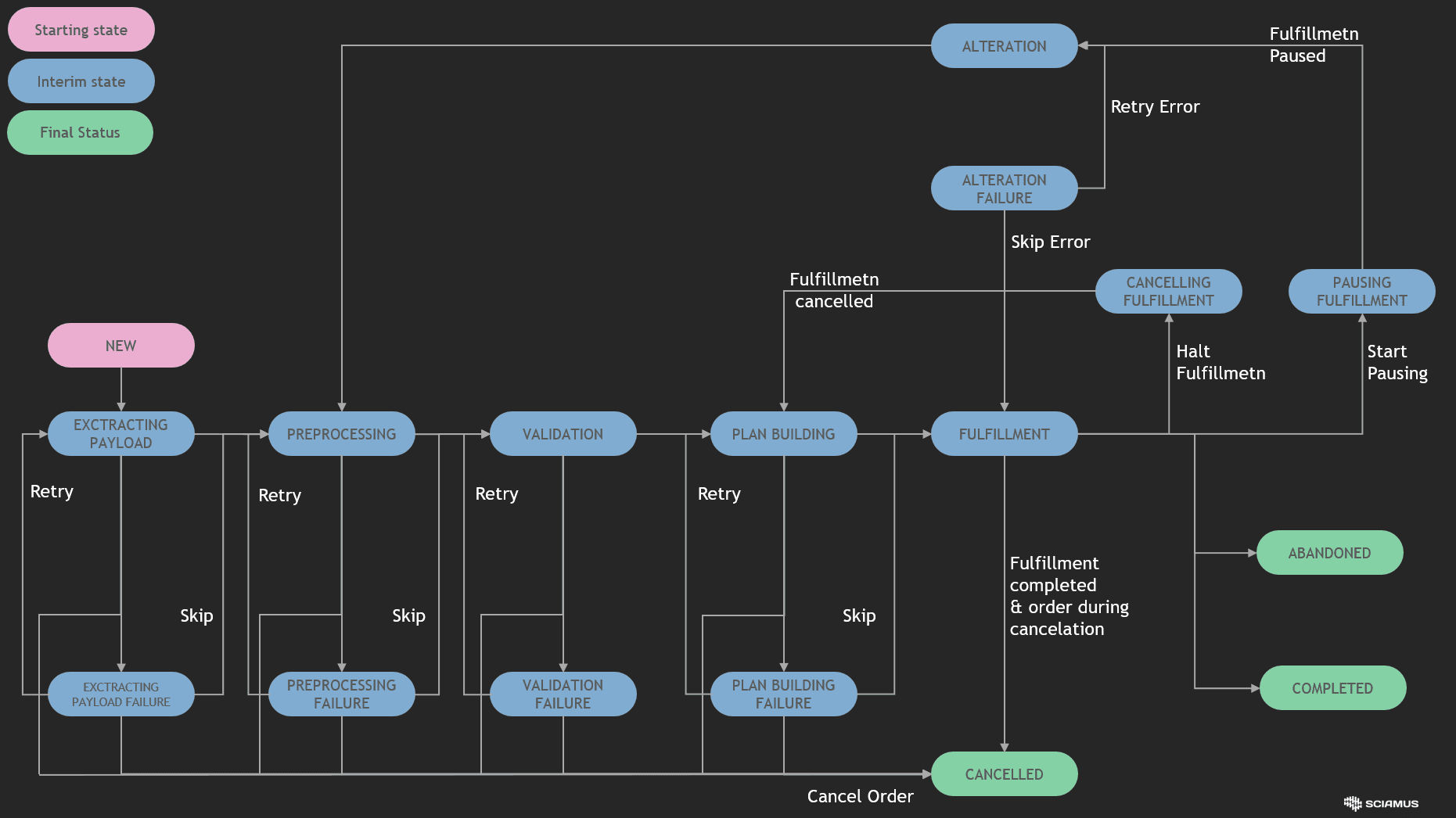
Status: PAUSING FULFILLMENT
Order alterations cannot be processed while tasks are still being executed. The system must either wait for the current step to complete or stop all Step Executors. No new steps will be initiated until the fulfillment process receives the next action.
Status: ALTERATION
After pausing a currently run fulfillment, the orders domain can proceed with the alteration.
Combining payloads
The custom PayloadOperator combines current payload with the alteration payload. It's primary function is adding, deleting or modifying product items, but its exact behavior depends on the system’s implementation.
Marking alteration as executed
Once an alteration is marked as executed, the system transitions back to the plan-building phase.
Moving back to a plan builder state
Order now moves back to the very early stage: PREPROCESSING. This step is necessary to collect any missing data resulting from the updated order payload. Next, validation is done (to ensure we can move with a new payload). Finally, the process transitions to the Plan Building phase.
Plan rebuilding
The plan builder uses four input components to generate a new plan:
- Current order (with payload)
- A delta of payload (from alteration execution)
- A current fulfillment plan state (with each step in executed or not status)
- A product catalogue.
The algorithm is complex, but the key difference between the altered and original plan-building logic is:
- Comparing the tasks completed so far with the tasks that should have been completed
- Continuing execution from the point of interruption, considering the new plan
Continuation of order fulfillment
Once the previous steps are paused or completed, the new fulfillment plan initiates order execution according to the rebuilt plan. Upon completion of this process, the entire order processing is finalized.

As a result of the alteration, previously unstarted steps (marked in purple) have been discarded. The newly added alteration steps are visible on the right.
Rebuilding the Order Plan After Alteration
Division into parts
The post-alteration plan contains two key parts:
-
Compensatory part - this relates to products and resources that have already been added in the system (e.g., in southern zones) and need to be withdrawn
-
Balancing part - this involves elements that need to be added after the alteration
Multiple alterations
Alterations can be made multiple times without any limitations. Each new alteration causes:
-
Fulfillment to pause,
-
Order payload to be updated
-
The plan to be rebuilt and restarted, until the order execution is successfully completed.