Future Dated Orders
The Future dated orders (FDO) feature allows postponing order processing at a specific status until a predetermined future date.
Problem
In some cases, it is necessary to initiate order processing but delay fulfillment or plan building until a specific future date. Each incoming order from the North must have its own scheduled date, and the system should allow configuration of the precise state at which the order’s processing is paused.
Solution
This functionality is implemented solely within the orders domain.
To address this requirement, we have customized the order payload processing. During the initial EXTRACTING_PAYLOAD phase, an additional field — the future date — is extracted from the payload and stored as an internal order attribute. Moreover, the future date can be modified either through a dedicated command or via payload updates (whether manual or through the alteration process). After each payload update, our customization logic re-extracts the field. The future date is also updatable via a REST API call, which is transformed into a synchronous command that updates the payload (according to the customization logic) and refreshes the computed "scheduled" field.
To retrieve the updated order details, including the computed scheduled date, you can use the standard orders detail endpoint: BFF Endpoints
How It Works
In a standard flow, an order follows this state machine:
EXTRACTING_PAYLOAD -> PREPROCESSING -> VALIDATING -> PLAN_BUILDING -> FULFILLINGFor orders that are FDO (with a non-null payload field), the future date determines the state at which processing is paused. This pause state is configured in the application.yaml file. For example, if the application is set to pause before PLAN_BUILDING state:
som:
  features:
    future-date-orders:
      scheduled-state: PLAN_BUILDING
      enabled: true
      cron: "*/5 * * * * *"
the standard flow is enhanced with a new state: SCHEDULED_PLAN_BUILDING. The order will then proceed as follows:
EXTRACTING_PAYLOAD -> PREPROCESSING -> VALIDATING -> SCHEDULED_PLAN_BUILDING -> PLAN_BUILDING -> FULFILLINGThis pause state is applied individually to each order. Thus, if an administrator updates the pause configuration, any new order will use the new state while existing orders continue processing based on the configuration in effect at the time of their creation.
To process orders with a due future date, a separate task is scheduled to run on a single instance of the orders service. All service instances share a MongoDB-based locking mechanism, ensuring that only one active instance performs periodic checks and pushes orders whose scheduled date has arrived.
Scheduled unblocking
There is a possibility of configuring how often an application scheduler is trying to release orders from SCHEDULED_ state - the only thing to do is to add a suitable cron expression in application.yml (see above).
Custom Implementation
To enable both the extraction and updating of the future date during payload updates, additional customization is required. Besides the standard Orders Payload Operator, an extra interface must be implemented:
import java.time.OffsetDateTime;
import java.util.Optional;

public interface FutureOrderOperator {

    default Optional<OffsetDateTime> extractFutureDate() {
        return Optional.empty();
    }

    default Object updateFutureDate(OffsetDateTime futureDate) {
        throw new UnsupportedOperationException("Updating future order date is not supported");
    }

}
This interface provides methods to both extract and update the future date.
Below is an example of DEV implementation.
import com.sciamus.som.dev.model.order.dto.ProductOrder;
import com.sciamus.som.orderservice.operator.FutureOrderOperator;

import java.time.OffsetDateTime;
import java.util.Optional;

public class DevFutureDatedOrdersOperator implements FutureOrderOperator {

    private final ProductOrder productOrder;

    public DevFutureDatedOrdersOperator(Object productOrder) {
        this.productOrder = (ProductOrder) productOrder;
    }

    @Override
    public Object updateFutureDate(OffsetDateTime futureDate) {

        productOrder.setRequestedStartDate(futureDate);

        return productOrder;
    }

    @Override
    public Optional<OffsetDateTime> extractFutureDate() {

        return Optional.ofNullable(productOrder)
            .map(ProductOrder::getRequestedStartDate);
    }
}
Updating future order
As described earlier, the future date is derived from the payload. Once an order reaches the last allowed state, it transitions into a SCHEDULED_XXX state and waits until the scheduled date is reached. At that point, the future date can be adjusted to either expedite or further postpone order processing. There are several ways to update this date:
REST Call to Update the Date
A BFF service offers a set of REST endpoints to retrieve and update the future date. See
BFF future date update endpoint for details.
Updating via GUI
The future order date can be also updated via GUI by an authorized operator (the update_order_future_date permission is needed). If an order with FDO arrives (or more precisely, an order that has a future date extracted by future order date operator), the GUI renders a dedicated button that allows FDO modification, as seen below:

After clicking the button, a dialog shows allowing the operator to select a new future date:
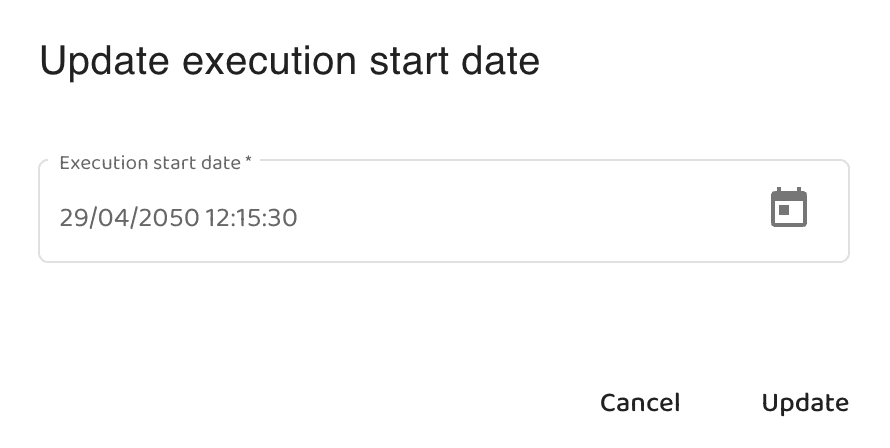
After clicking the calendar icon, the operator can access a handy date picker:
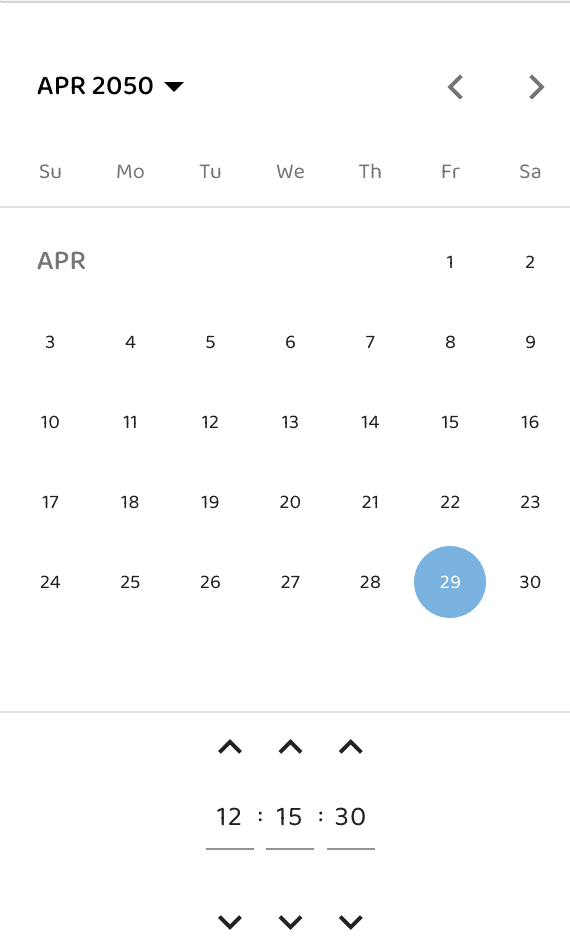
After confirming the date and clicking the update button, the date will be updated.
Direct Payload Modification
A separate REST call to change a whole payload (including the future date field) may be used.
Alteration Mechanism
Payload alterations automatically update the future date, as this field is re-extracted from the payload after each update.